> For the complete documentation index, see [llms.txt](https://help.makeshop.co.kr/llms.txt). Markdown versions of documentation pages are available by appending `.md` to page URLs; this page is available as [Markdown](https://help.makeshop.co.kr/manual/set/undefined/undefined-4.md).
# 개인정보보호주문 데이터 분리 설정
개인정보보호 대상인 휴면회원, 비회원, 탈퇴회원은 대상별 분리 시점에 따라 주문 데이터가 별도로 분리되어 보관되도록 설정해야 해요.
{% hint style="danger" %}
주문정보통신망법 제29조에 의거하여 개인정보보호 대상별 주문 데이터 분리를 해야하며, 미분리시 3,000만원 이하의 과태료가 부과돼요.
{% endhint %}
## 관리자 메뉴 위치
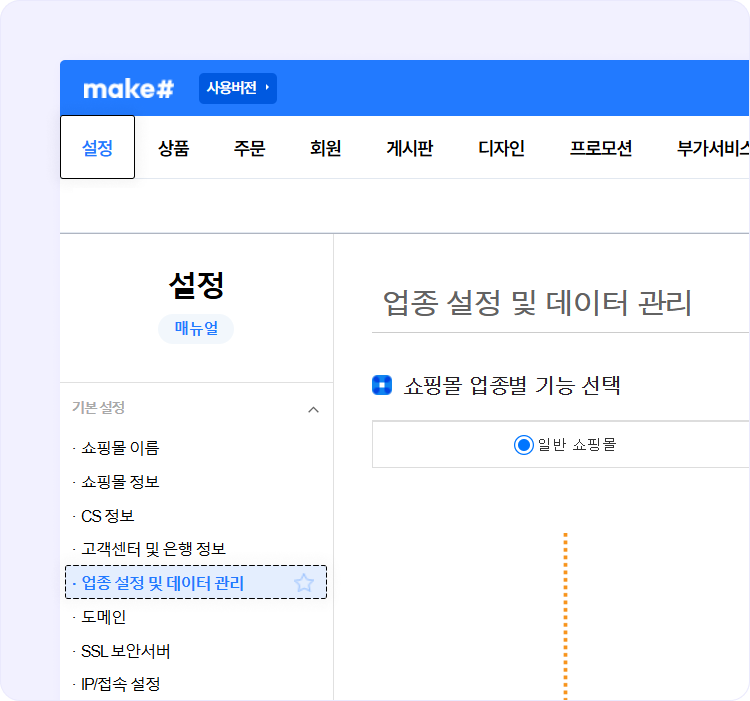
`설정` > `기본 설정` > `업종 설정 및 데이터 관리`
## 메뉴 안내 및 설정 방법
{% stepper %}
{% step %}
법률에 맞춰 제공되는 '개인정보보호대상 주문 데이터 분리(권장)' 조건을 선택해 주세요.
{% endstep %}
{% step %}
비회원 주문 데이터 분리 조건을 '주문 90일 후 or 180일 후' 중 원하시는 조건으로 선택해 주세요.
{% endstep %}
{% step %}
권장 조건을 선택하고 \[확인] 버튼으로 저장을 완료해 주세요.
{% endstep %}
{% endstepper %}
{% hint style="warning" %}
참고
* 개인정보보호 대상인 휴면회원, 비회원, 탈퇴회원에 따라 분리 시점이 다르니 해당 메뉴의 주의문구를 확인해 주세요.
* \[개인정보보호대상 주문서 데이터 분리] 설정 시 설정한 날로부터 개인정보보호대상 주문서는 익일 분리 처리돼요.
* 분리 보관된 개인정보는 `주문` > `부가 기능` > `개인정보보호 주문 검색`메뉴에서 조회 가능해요.
* \[개인정보보호대상 주문 데이터 분리(권장)]으로 설정 변경 할 경우 \[개인정보보호대상 주문 데이터 미분리]으로 재설정되지 않아요.
* 비회원 주문 데이터 분리 설정에 따라 주문일로부터 90일 또는 180일이 지난 시점에 비회원 주문 데이터가 분리 보관돼요.
* \[개인정보보호대상 주문 데이터 미분리]으로 설정하여 발생할 수 있는 모든 법적 책임소지 및 처벌은 이용하시는 상점에 있어요.
{% endhint %}
### 분리된 개인정보보호 대상 주문검색 방법
**관리자 메뉴 위치 :** `주문` > `부가 기능` > `개인정보보호 주문 검색`
### 검색 방법
{% stepper %}
{% step %}
주문 정보를 입력하세요.
{% endstep %}
{% step %}
주문날짜를 지정해 주세요.
{% endstep %}
{% step %}
회원 상태를 체크해 주세요.
{% endstep %}
{% step %}
\[검색] 버튼 클릭해 주세요.
{% endstep %}
{% step %}
분리된 주문내역을 확인해 보세요.
{% endstep %}
{% endstepper %}
{% hint style="warning" %}
참고
* 주문정보는 주문번호,아이디로 조건검색 가능하며, 모르실 경우 공란으로 검색하세요.
* 검색된 주문내역에서 주문번호를 클릭할 경우 주문상세 페이지에서 자세한 정보 확인 가능해요.
* 개인정보보호대상 주문 정보는 동일 연도에 한해서만 조회가 가능해요. (예 : 2018년 1월 1일 \~ 2018년 10월 31일)
{% endhint %}
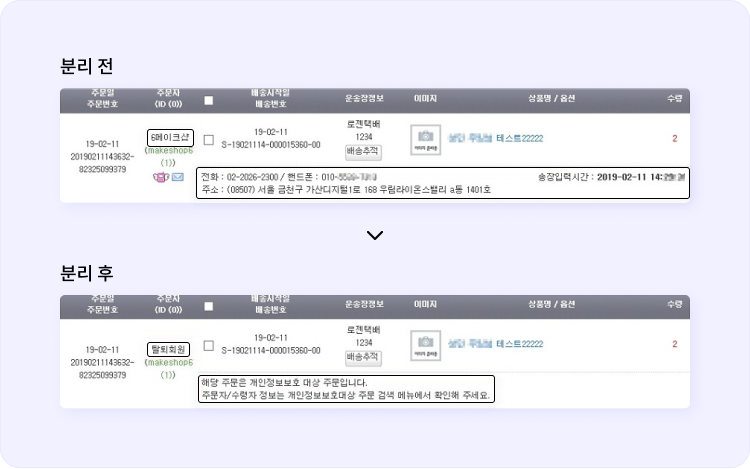
### 개인정보보호 주문서 분리 전/후 비교
{% tabs %}
{% tab title="전체 주문 관리" %}
**관리자 메뉴 위치 :** `주문` > `주문 관리` > `전체 주문 관리`
{% endtab %}
{% tab title="주문서 상세 페이지" %}
**관리자 메뉴 위치 :** `주문상세 페이지 접속`
주문 상세창에 보이는 모습
{% endtab %}
{% endtabs %}
{% hint style="warning" %}
참고
* 분리된 개인정보 보호 대상의 주문내역은 \[개인정보보호 대상 주문 검색]메뉴를 제외하고는 주문번호, 아이디 외에는 확인되지 않아요.
* 통합 주문 리스트 / 거래완료 리스트 외에도 주문서 확인이 가능한 메뉴에서 개인정보보호대상의 주문서 상세페이지를 접속할 경우 주문자 정보, 수령인 정보를 모두 확인할 수 없어요.
* 자세한 주문자 정보 확인이 필요할 경우 \[개인정보 보호 대상 주문 검색] 메뉴에서 확인해 주시면 돼요.
{% endhint %}