> For the complete documentation index, see [llms.txt](https://help.makeshop.co.kr/llms.txt). Markdown versions of documentation pages are available by appending `.md` to page URLs; this page is available as [Markdown](https://help.makeshop.co.kr/manual/set/undefined/undefined-2.md).
# 고객응대 관련정보
자동 발송 메일 등에 이용되는 쇼핑몰 대표 메일을 설정하고, 쇼핑몰 하단에 노출되는 전화번호와 주소를 입력할 수 있는 기능이에요.
## 관리자 메뉴 위치
`설정` > `기본 설정` > `CS 정보`
## 메뉴 안내 및 설정 방법
{% tabs %}
{% tab title="① 대표 이메일" %}
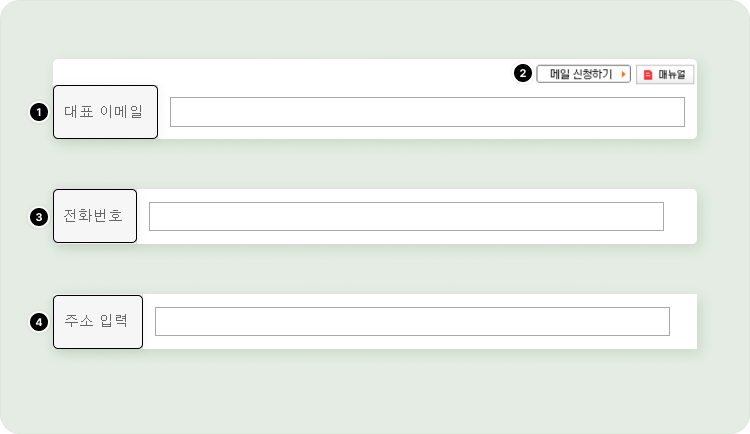
* 쇼핑몰 도메인으로 메일 신청 시 메일 주소 입력 및 주문 메일 등 관리자에게 발송될 메일에 대해서 수신 받을 메일 주소를 입력하는 메뉴에요.
* 상점에서 이용하는 메일 주소를 입력하면 돼요.
{% hint style="warning" %}
참고
* \[메일 신청하기] 버튼을 클릭해서 주 도메인에 따른 메일 발급 신청이 가능해요.
* 네이버나 다음 등 외부 메일 계정 입력해서도 이용 가능해요.
* 단, 외부 메일 계정을 이용할 경우 외부 메일 업체의 정책으로 인해서 주문 메일 등 자동 발송 메일이 수신되지 않거나 쇼핑몰 회원들에게 전체 메일 발송 시 보낸 메일이 외부 메일 계정으로 표시되지만 실제 외부 메일 업체 메일 서버에서 메일이 발송되는 게 아니기 때문에 메일 수신 받는 업체 정책에 따라서 메일이 수신되지 않을 수도 있어요.
* 가급적 메이크샵을 통한 메일을 신청해서 이용하는걸 권장해요
* 주 도메인에 따른 메일 신청 후 발급이 완료된 경우 `게시판` > `메일` > `메일함` 통해 메일 접속이 가능해요.
{% endhint %}
{% endtab %}
{% tab title="② 메일 신청버튼" %}
주 도메인에 따른 메일 계정을 신청하는 버튼이에요.
{% endtab %}
{% tab title="③ 전화번호" %}
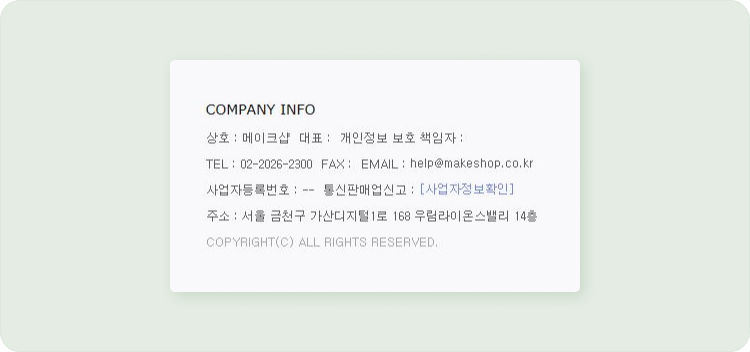
쇼핑몰 하단에 노출될 쇼핑몰 대표 전화번호를 입력해 주세요.
{% endtab %}
{% tab title="④ 주소 입력" %}
쇼핑몰 하단에 노출될 쇼핑몰 주소를 입력해 주세요.
{% endtab %}
{% endtabs %}
## 적용 화면
{% tabs %}
{% tab title="관리자" %}