> For the complete documentation index, see [llms.txt](https://help.makeshop.co.kr/llms.txt). Markdown versions of documentation pages are available by appending `.md` to page URLs; this page is available as [Markdown](https://help.makeshop.co.kr/manual/member/undefined/undefined-12.md).
# 비밀번호 변경 설정 방법
회원가입 시 비밀번호에 대한 제한 조건 적용 및 주기적으로 회원들에게 비밀번호 변경을 권장하는 화면을 띄울 수 있는 기능이에요.
## 관리자 메뉴 위치
1. `설정` > `회원 설정` > `비밀번호 갱신 설정`
2. `설정` > `회원 설정` > `회원 가입 정보 관리`
## 메뉴 안내 및 설정 방법
* 회원가입 및 회원정보 수정 시 비밀번호에 대한 제한 조건 적용이 가능해요.
* 쇼핑몰에 로그인 시 비밀번호 변경에 대한 팝업 또는 화면 노출에 대한 사용 여부 설정이 가능해요.
* 비밀번호 변경에 대한 팝업 또는 화면이 노출되는 주기 선택이 가능해요.
* 비밀번호 변경에 대한 내용을 팝업으로 노출할건지 화면으로 노출 할 건지 선택 가능해요.
## 적용 화면
{% tabs %}
{% tab title="비밀번호 규칙 설정" %}
규칙 설정에 따른 회원가입 페이지에서의 노출 화면 (제한 없이 4 ~ 16자)
규칙 설정에 따른 회원가입 페이지에서의 노출 화면 (영문 대소문자/숫자/특수문자를 혼용하여 2종류 10 ~ 16자 또는 3종류 8 ~ 16자)
{% endtab %}
{% tab title="비밀번호 변경안내 설정" %}
비밀번호 변경안내 설정 (팝업)
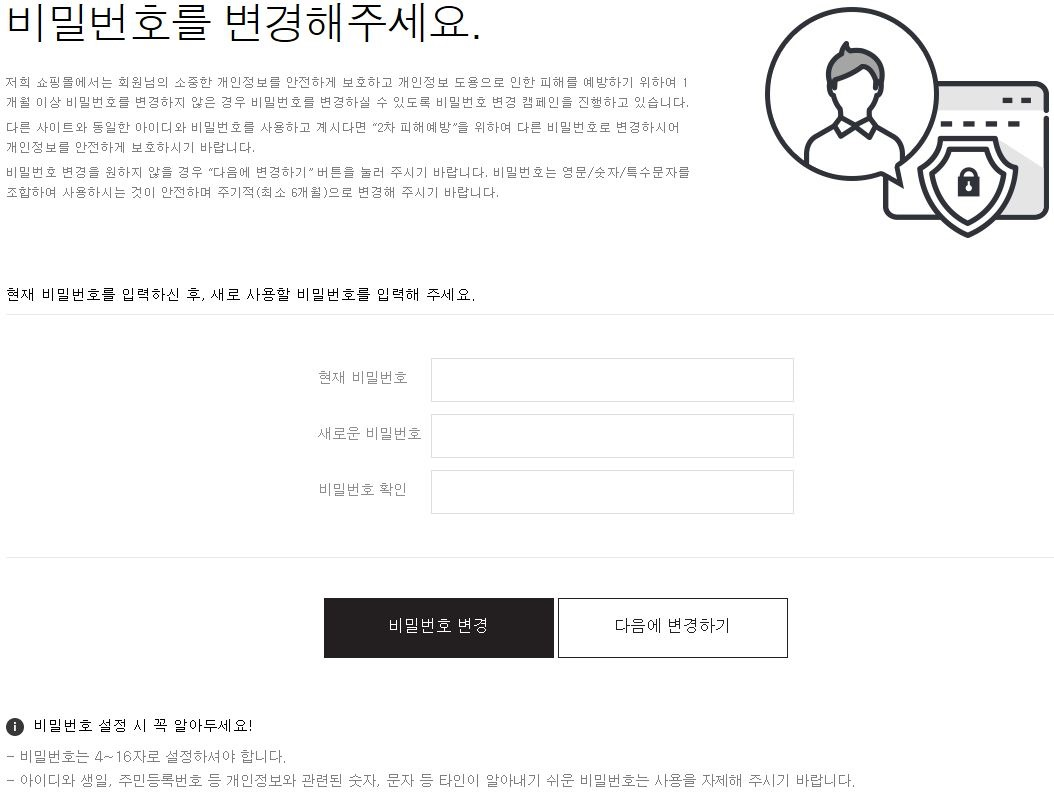
* 비밀번호 변경안내 노출 설정 시 비밀번호 변경안내 팝업에서 비밀번호 변경 버튼을 클릭하면 아래 화면으로 연결돼요.
{% endtab %}
{% endtabs %}
{% hint style="warning" %}
참고
* 안전한 비밀번호 설정을 위하여 다음의 경우는 비밀번호로 사용이 가능하지 않아요.
* ① 4자 이상 연속적인 숫자 또는 문자 (23456789 / abcdefgh)
* ② 동일한 숫자 또는 문자를 4번 이상 반복 (aaaabcde / 123333456)
* ③ 영문, 숫자, 특수문자를 혼용하지 않은 단일 문자
* ④ 아이디와 4자 이상 동일하거나 기존과 동일한 비밀번호
* ⑤ 특수문자 ( ‘ , “ , ) 또는 공백
{% endhint %}
.png?alt=media&token=91416e03-4d73-4b55-8e5a-42a6270c5bdd)
.png?alt=media&token=18f3f57d-da85-47d4-bb22-567de4ed5ae6)
.png?alt=media&token=3d0fc424-9883-4426-bff7-5c28eace6774)
.png?alt=media&token=6fb537b1-cc0f-4b15-bddf-3546ee58c35e)
.png?alt=media&token=121c5c24-27b8-4c0d-a53c-6470f7a32327)