> For the complete documentation index, see [llms.txt](https://help.makeshop.co.kr/llms.txt). Markdown versions of documentation pages are available by appending `.md` to page URLs; this page is available as [Markdown](https://help.makeshop.co.kr/faq/customer/undefined/kakao_error.md).
# 카카오 로그인 시 동의 후 메인 페이지로 이동해요. 왜 그런가요?
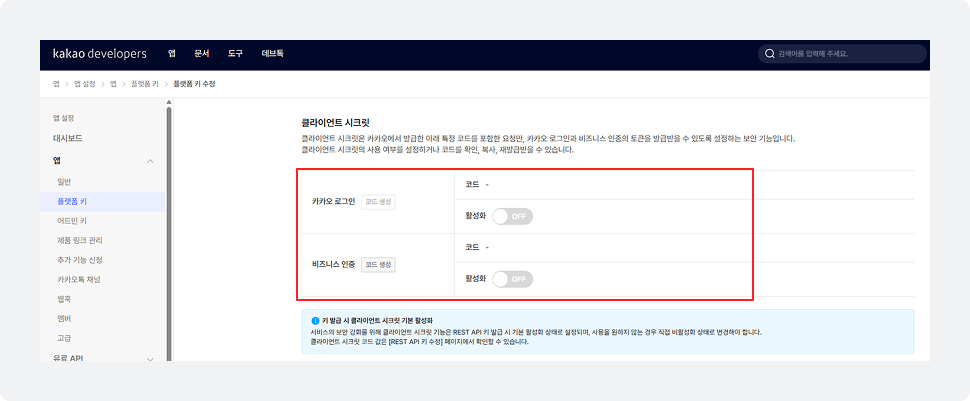
해당 현상은 카카오 디벨로퍼스 앱의 **시크릿키 활성화 설정**으로 인해 발생할 수 있어요.
***
카카오 로그인 동의 후 가입 또는 로그인이 완료되지 않고 메인 페이지로 이동한다면,\
카카오 앱 설정에서 **시크릿키가 활성화되어 있는 경우**일 수 있어요.
이 경우 카카오 로그인 연동이 정상적으로 처리되지 않을 수 있으니,\
**카카오 디벨로퍼스 > 앱 설정에서 시크릿키를 비활성화**한 후 다시 로그인해 주세요.
{% stepper %}
{% step %}
카카오 디벨로퍼스에 접속해요.
{% endstep %}
{% step %}
사용 중인 앱을 선택해요.
{% endstep %}
{% step %}
앱 설정에서 시크릿키 상태를 확인해요.
{% endstep %}
{% step %}
시크릿키가 활성화되어 있다면 비활성화로 변경해요.
{% endstep %}
{% step %}
쇼핑몰에서 다시 카카오 로그인을 시도해요.
{% endstep %}
{% endstepper %}